
Skip to content

Body Battery for Apple Watch: see how much energy you have left

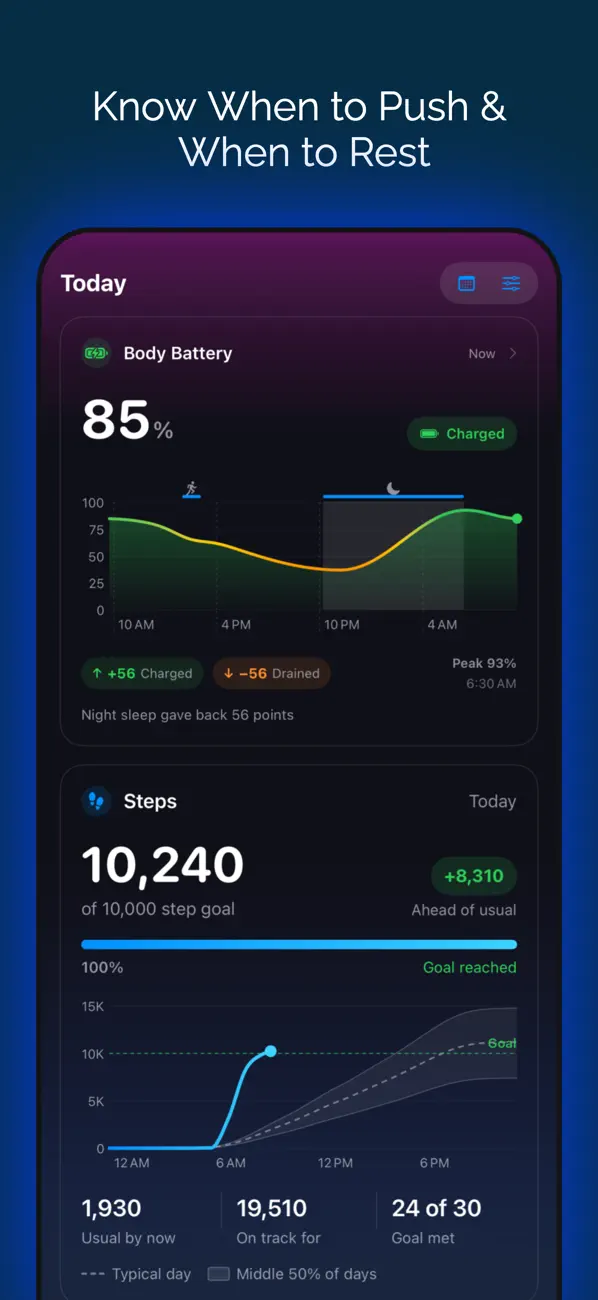
Body Battery is a 0-100% energy reserve that rises and falls through the day. Sleep charges it, effort drains it and calm moments give some back, so at any point you can see how much you have left in the tank and what used it up.

Updated

In short

FitRest shows your energy level on Apple Watch as a 0-100% reserve that moves through the day. Sleep charges it, effort and busy stretches drain it, and calm moments give a little back. You can see it on the iPhone Dashboard, in widgets, in the FitRest watch app and as a watch complication.

Download on the App Store
FitRest Body Battery at 85% with its daily curve, above a steps chart showing 10,240 steps against a 10,000 goal
Scale
0-100%
Where
Dashboard, widgets, Apple Watch
Updates
Through the day
Needs
A watch worn day and night

What Body Battery shows

The Body Battery card on the Dashboard draws your energy reserve as a curve across the day. Alongside it you see where you are Now (or at End of day for a past day), your Peak and Low, and how much you Charged and Drained in total. Unlike Recovery, which is set once in the morning, Body Battery keeps moving as you go about your day.

The app explains what moves it in four plain rules:

  • Sleep charges you. A restful night gives back far more than a restless one, however long you were in bed.
  • Effort drains you. Easy movement costs little and hard training costs a lot.
  • Calm gives some back. When you settle while awake, the reserve trickles back up.
  • Recovery sets the ceiling. A poor night cannot reach 100 no matter how long you sleep.

Why an energy reserve is useful

Most people judge their energy by feel, and feel is easily fooled by coffee, adrenaline or a deadline. A reserve that follows your body's actual load gives you a second opinion. It helps answer practical questions: do I have enough left for an evening workout, or should I keep it easy? Why am I flat by mid-afternoon on some days and not others?

It also shows how connected rest and effort are. A short or restless night means you start the day with less. A day of back-to-back meetings with no breaks, or a hard session on top of a busy schedule, drains you faster. A walk, a quiet lunch or a few minutes of slow breathing can give a little back. Seeing that play out on your own curve makes it easier to plan days that leave something in reserve, which in turn sets you up for a better night.

Inside the Body Battery detail

Tap the card for an interactive day curve you can scrub to see your reserve at any point. What Moved It lists your Biggest gains and Biggest costs, so you can tell whether it was the night, the workout or a long stressful stretch that drained you.

Last 7 Days shows a range bar for each day: each bar spans that day's lowest to highest reserve and a dot marks where the day ended, with your average peak alongside. A week of low ceilings usually points back to sleep or recovery; a week of deep dips points to load.

What you need and where to see it

Body Battery needs continuous heart rate and sleep from your watch, so wear it overnight and through the day. Data from other devices or apps that save to Apple Health counts too.

Beyond the Dashboard, Body Battery is on the Today page of the FitRest Apple Watch app with a Last 24 Hours curve, as a watch complication, as Small and Last 24 Hours iPhone widgets, and as a Lock Screen widget.

Energy level, active energy and battery: not the same thing

Searches for energy on Apple Watch mix up three different ideas, so it helps to separate them:

  • Your energy reserve - how much you have left in the tank today. This is what the FitRest card shows, as a 0-100% level.
  • Active and resting energy - the calories your body burns, which Apple Watch and iPhone save to Apple Health. FitRest shows those on its Energy tile.
  • Battery level - how much charge your watch has left. That has nothing to do with your body.

How to keep more energy in reserve

Your morning level mostly comes down to the night before, and the rest of the curve comes down to how you spend the day. A few habits make the biggest difference:

  • Sleep long enough and at regular times. A restful night is the main charge for the whole day.
  • Spread hard efforts out. A hard workout on top of an already draining day leaves little for the evening.
  • Take real breaks. A few minutes away from the screen, a short walk or slow breathing can give a little back.
  • Wind down in the evening, so the reserve has a better chance to recharge overnight.

Sources

How to use it

  1. 1Check your morning level to see how much the night charged you before you plan the day.
  2. 2Look at the reserve before an evening workout and keep it easy if you are already low.
  3. 3Use What Moved It to find the biggest drains in your day and the habits that give energy back.
  4. 4Take a short calm break when the curve drops steeply and watch for the reserve to recover.
  5. 5Put the Body Battery complication on your watch face to see your level at a glance.

Body Battery: questions and answers

Does Apple Watch show your energy level?

With FitRest it does. FitRest builds an energy reserve from the heart rate and sleep your Apple Watch saves to Apple Health, and shows it as a 0-100% level on iPhone, in widgets, in the FitRest watch app and as a complication. In the app the card is called Body Battery.

How do I check my energy level on Apple Watch?

Open the FitRest app on your watch and look at the Today page, which shows your reserve with a Last 24 Hours curve. For a glance without opening anything, add the FitRest complication to your watch face.

Is my energy level the same as active energy?

No. Active and resting energy are calories burned, which FitRest shows on its Energy tile. Your energy level is how much reserve you have left for the day, which tends to go down as you burn more, not up.

What is a good energy level?

A good day usually starts high after a restful night and ends with some reserve left rather than near the floor. Compare with your own recent days in Last 7 Days, since what is typical varies from person to person.

Why is my energy level low in the morning?

A short or restless night gives back less, and a poor Recovery score lowers the ceiling for the day. Late alcohol, a heavy late meal, illness or a stressful evening are common reasons. What Moved It shows how much the night actually charged you.

Why didn't my energy level reach 100 after a long sleep?

Your Recovery score sets the ceiling for the day, so a poor night cannot charge you to 100 however long you stay in bed.

How is the energy reserve different from the Recovery score?

Recovery is a single morning verdict on last night. The energy reserve starts from that night and keeps moving through the day as effort drains it and rest tops it up.

Why does my energy level drop when I'm not exercising?

Stress and busy stretches raise your heart rate above resting too, and that draws on the reserve. Calm periods give a little back.

Do I need to wear my watch all the time?

For an accurate curve, yes. The reserve follows your heart rate through the day and your sleep at night, so gaps in wear leave gaps in what it can see. Data from other devices that save to Apple Health also works.

Guides on this topic

See your own patterns

FitRest reads the data already in Apple Health, so there is nothing to set up beyond granting access.

Download on the App Store

iPhone, iPad and Apple Watch. Requires iOS 17 or later.